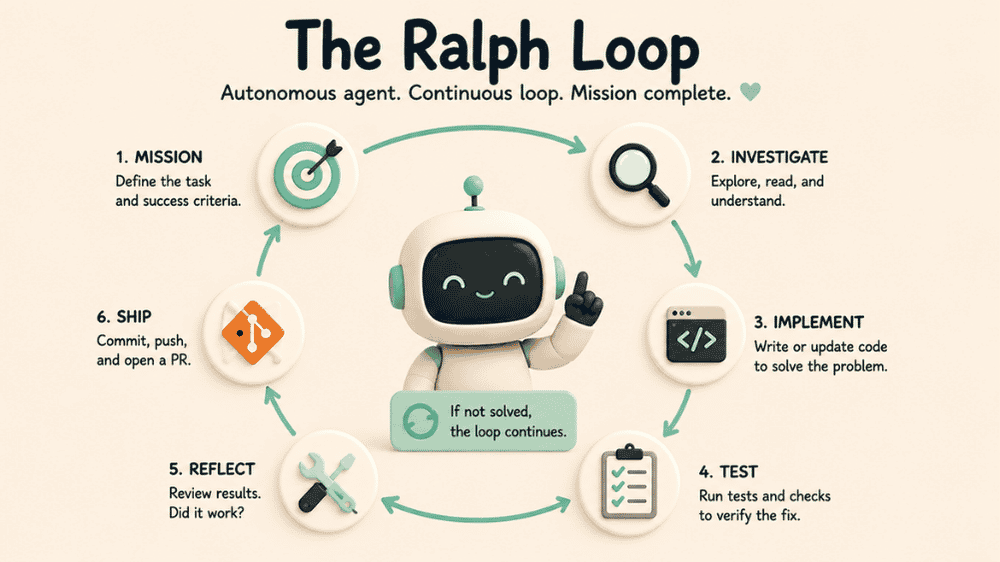
A Ralph Loop is not just “ask AI to write code.”
It is a structured automation loop where an AI coding agent keeps working through a software task until the job is actually finished. The agent investigates the codebase, reproduces the bug, writes the fix, runs tests, inspects failures, revises the implementation, verifies the result, commits the work, pushes the branch, and opens a pull request.
The important part is the loop.
The human does not micromanage every file. The human defines the mission, constraints, and stopping conditions. Then the agent runs the engineering cycle.
That is exactly what happened during a recent fix to the blog internal-linking system on All Great Things.
The Bug
The website has a dashboard feature that auto-inserts internal links into blog posts. When editing a post, the dashboard suggests related articles and anchor phrases. The editor can accept those suggestions, and the system automatically applies hyperlinks inside the blog content.
That feature is useful because internal links help readers move through related content and help search engines understand the structure of the site.
But there was a subtle production bug.
Some inserted links had broken anchor text. The link would sometimes steal a character from the previous word, miss the last character of the intended word, or split a multi-word phrase into a partial anchor.
Examples from production included:
- anddecision
- syste
- AI agen
- e agen
- d agen
That is the kind of bug that looks small but damages trust. The page still loads. The links still technically work. But the post looks sloppy, and the automated linking system becomes hard to trust.
The instruction to the agent was not “take a guess.”
The instruction was to run the full bug-fix loop:
- Find the responsible code path.
- Reproduce the bug locally.
- Identify the root cause.
- Implement the smallest safe fix.
- Add regression tests.
- Run the relevant test suite.
- Verify locally.
- Prepare the change for dev testing before production.
- Repeat until done.
That is the Ralph Loop.
The Loop Started by Creating a Safe Work Area
The first thing the agent did was inspect the Git tree.
The working directory was not clean. There were untracked files in the main workspace. Instead of mixing the fix into a dirty tree, the agent created a separate clean Git worktree and a dedicated branch:
codex-fix-blog-auto-internal-links
That mattered because the loop needed a clean boundary. The bug fix should not accidentally include unrelated local files, duplicate templates, uploads, or other noise.
The agent tried to create the preferred codex/... branch name, hit a local Git ref issue, adjusted to a safe branch name, and continued without touching unrelated work.
That is one of the advantages of a loop-based agent. It does not stop at the first setup problem. It works around the environment safely and keeps moving.
The Loop Found the Responsible Code Path
Next, the agent searched the repo for the internal-linking feature.
It found two key parts:
- The backend API endpoint: /api/internal-link-suggestions
- The dashboard JavaScript insertion logic: app/static/js/main.js
The backend generated suggestions: related posts and possible anchor terms.
But the malformed anchor text was not being created by the backend. The problem happened in the browser when the dashboard applied links inside the Quill editor.
That narrowed the bug from “something in the blog system” to a specific frontend insertion path.
The agent also identified multiple insertion flows:
- Accept All
- Insert Link
- Anchor chip click / toggle
- Highlighting suggested anchors
That mattered because a partial fix would not be enough. If one path used corrected logic but another path still used the old indexing behavior, the bug could come back.
The Loop Reproduced the Bug Before Fixing It
This was the most important part.
The agent did not change the regex and hope.
It built a small Quill-shaped fixture to reproduce the broken behavior locally. The reproduction simulated a blog editor document with an embed, such as an image, before the text.
That exposed the real cause.
The old code was doing this:
- Get plain text from Quill with quill.getText().
- Find the anchor position in that plain-text string.
- Apply the link with quill.formatText(index, length, ...).
At first glance, that seems reasonable.
But Quill has more than one representation of content. A Quill document can contain text operations and embed operations. An image or embed takes up space in Quill’s document index, even though plain-text matching does not line up perfectly with that same index space.
So the old system matched in one representation and replaced in another.
That caused index drift.
When an embed appeared before the target text, the link range could shift by one character. That explains the production examples exactly:
- decision became decisio
- system became syste
- AI agent became AI agen
The loop reproduced the failure before changing the implementation. That is the difference between a real fix and a plausible theory.
The Loop Implemented a Deterministic Fix
The fix was to stop trusting plain-text indexes as Quill document indexes.
The agent added a deterministic mapping layer.
Instead of only using quill.getText(), the new logic reads the Quill Delta with quill.getContents(). It walks through the Delta operations and builds a map from text positions back to actual Quill document positions.
The new flow is:
- Read the Quill document Delta.
- Build a searchable text representation.
- Track which text character maps to which Quill document index.
- Find full-word or full-phrase anchor matches.
- Convert the match back to the correct Quill document range.
- Apply quill.formatText() using the correct Quill index and length.
That fixed the root cause directly.
It also preserved surrounding punctuation and whitespace. If the sentence says:
Use AI agent, then system.
The link should wrap only AI agent, not the comma or the space before it.
The agent also updated all relevant insertion paths to use the same safe matching logic. Accept All, single Insert Link, chip highlighting, and chip toggling now share the corrected index handling.
The Loop Added Regression Tests
After the fix, the agent added JavaScript regression tests in:
tests/js/internal-linking.test.js
The tests covered the actual production failure patterns:
- Links do not capture characters from the previous word.
- Links do not drop the final character.
- Links respect full word boundaries.
- Multi-word anchor phrases are inserted correctly.
- Punctuation and whitespace around links stay intact.
- Embeds before text do not shift the linked range.
The key regression test recreated the dangerous case: an embed before text, followed by anchors like decision, system, and AI agent.
The corrected output linked exactly:
- decision
- system
- AI agent
Not syste. Not AI agen. Not a partial word.
That is the proof the loop needed.
The Loop Ran the Tests
The agent then ran the focused JavaScript tests:
node --test tests/js/internal-linking.test.js
Result:
6 passed
Then it ran the broader Python suite:
env DATABASE_URL=sqlite:///:memory: venv/bin/python -m pytest tests
Result:
48 passed, 1 skipped
The first test run exposed missing local dependencies, so the agent created a local virtual environment, installed requirements, installed pytest, and reran the suite.
That is another Ralph Loop behavior: when verification is blocked, the loop fixes the test environment and tries again.
The Loop Verified the Local Site
The agent started the Flask app locally.
At first, the app used an in-memory SQLite database. That worked for some routes, but login failed because the sign-in route uses a direct psycopg2 connection and expects a Postgres-style DATABASE_URL.
The agent diagnosed that, restarted the server using the local .env, and connected to the dev database.
Then another blocker appeared: the sign-in route was rate-limited at 2 per minute, which made local dashboard testing painful. The user asked to change it to 10, so the agent updated the limiter to:
10 per minute
That change was also tested and committed on the same branch.
The local preview then loaded correctly, and the affected blog post looked good in the browser.
The Loop Committed, Pushed, and Opened the PR
Once the fix was implemented and verified, the agent staged the intended files, committed the work, pushed the branch to GitHub, and opened a draft pull request.
The final PR included:
- The internal-linking fix
- Regression tests
- The sign-in rate-limit adjustment
- Test results
- Root cause explanation
- Dev validation notes
The PR was opened here:
https://github.com/Jasonmellet/AGT_V9/pull/13
That completed the loop.
Why This Is Different From Normal AI Coding
A normal AI coding request might produce a suggested patch.
A Ralph Loop produces a completed engineering workflow.
The agent did not just say what might be wrong. It:
- created a clean branch
- found the code path
- reproduced the bug
- proved the cause
- implemented a targeted fix
- added regression tests
- ran the test suite
- handled local environment blockers
- verified the app in-browser
- committed the code
- pushed to GitHub
- opened a pull request
The human’s role was to define the goal, approve the direction, test the result, and decide when it was ready for review.
The loop handled the execution.
That is the power of Ralph Loops. They turn AI coding from a one-shot answer machine into an autonomous software delivery cycle. Instead of stopping at “here is a possible fix,” the agent keeps going until the fix is reproduced, proven, packaged, and ready for the next environment.